
The short answer
Credentialing software helps by keeping each provider's data, documents and verifications in one record, automating reminders for expiring credentials and recredentialing, tracking payer enrollment and committee work as owned tasks, and keeping an audit trail. It reduces manual chasing, re-keying and spreadsheet risk; it does not replace staff judgment, payer processing times or your accreditation obligations.
01
Where manual credentialing breaks down
Most credentialing teams start with spreadsheets, shared drives and email. That works at small volume. As providers, payers and facilities multiply, the same weak points appear in almost every organization:
- Provider data is re-typed into many applications, and copies drift out of sync
- Expiration dates live in a spreadsheet that one person maintains
- Verification evidence is scattered across folders and inboxes
- Nobody can quickly answer “where is this application?” for a given payer
- Preparing for an audit or committee meeting means days of assembling files
02
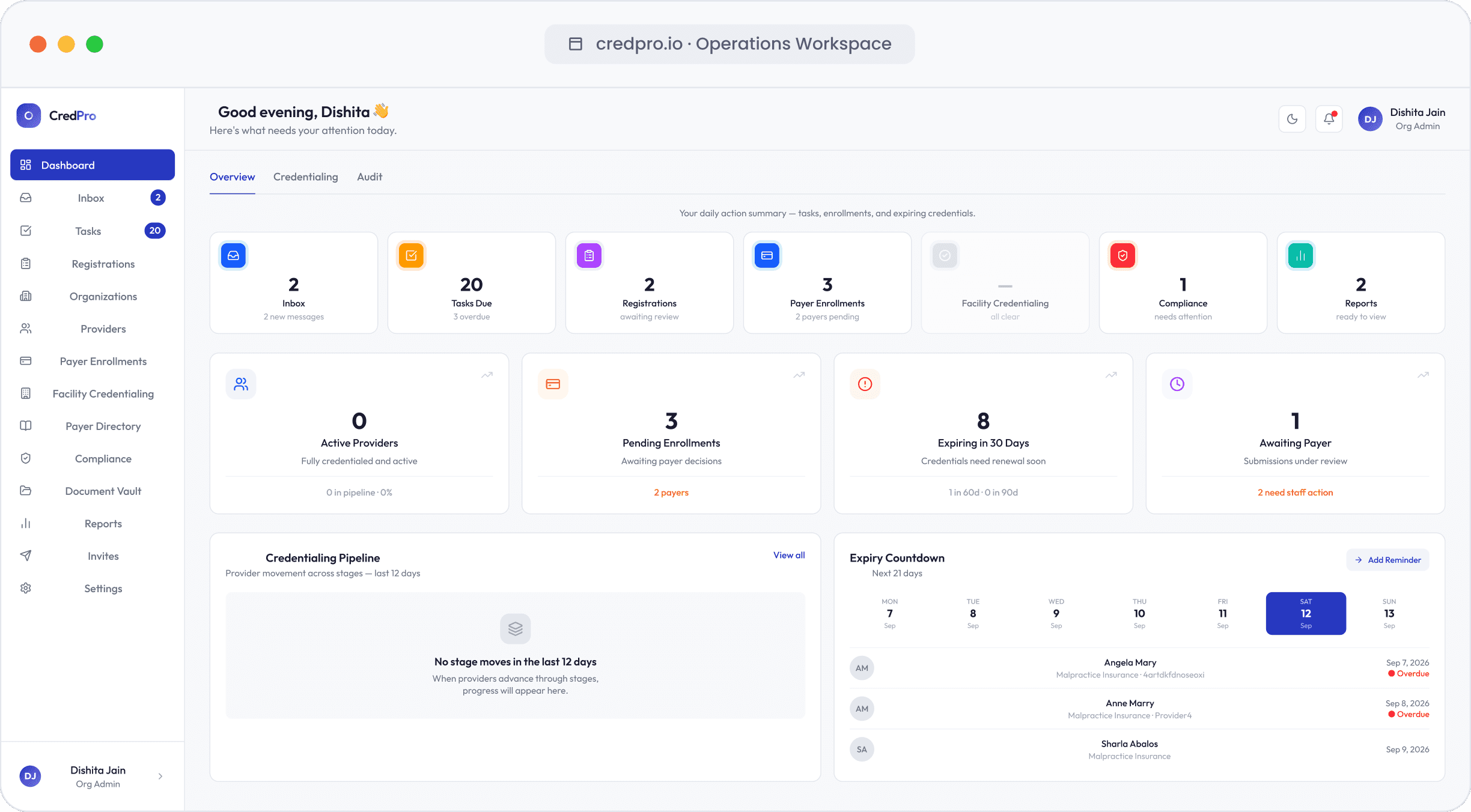
What credentialing software typically does
Products differ, but most credentialing platforms cover some combination of the following:
- Provider intake — online applications or profile collection, document upload and electronic attestation
- Provider data management — one profile per provider, reused across applications and kept in sync with CAQH ProView and other sources
- Verification tracking — status, method, date, outcome and evidence for each credential, sometimes with automated lookups
- Monitoring — expiration reminders, exclusion screening and recredentialing schedules
- Enrollment tracking — every provider × payer application with stage, owner, follow-ups and effective dates
- Committee workflow — file review, privileging, approvals and minutes for medical staff offices
- Reporting and audit trail — status reports, file completeness and a log of who did what and when
03
What software can't do
Software changes how much effort each step takes and how quickly problems surface. It does not change the parts of credentialing that belong to someone else or require judgment:
- Payer, licensing board and training program turnaround times
- Committee and board meeting schedules
- Clinical judgment about competence and privileges
- Your organization's accountability under accreditation standards and payer contracts
Treat claims that software alone will cut credentialing to a few days with caution. Realistic gains come from fewer errors, less duplicate entry, earlier detection of problems and staff time redirected to exceptions. For how timelines really work, see how long credentialing takes.
04
Different organizations, different needs
The right tool depends on who you are. CVOs and MSOs need high-volume verification, client separation and client-ready reporting. Hospital medical staff offices need privileging, committee workflow, reappointment and professional practice evaluation support. Billing companies care most about payer enrollment status and effective dates across many clients. Provider groups need fast onboarding and a clear view of when each new clinician can bill each payer.
Before evaluating products, write down the three or four workflows that cause you the most pain today. Judge every product against those, not against a feature list.
05
Vendor-neutral evaluation criteria
These criteria apply whichever products you are comparing:
- Data model — can it represent providers, payers, facilities, locations and billing entities the way your organization actually works?
- Verification evidence — does each verification record source, method, date, outcome, owner and proof?
- Monitoring — which sources and expirations are monitored, how often, and how are results documented?
- Provider experience — can providers complete profiles and upload documents easily and securely?
- Configurability — can workflows, checklists and committee steps match your bylaws and policies without custom development?
- Reporting — can you see status, aging and blockers across providers and payers without exporting to spreadsheets?
- Security and privacy — role-based access, audit logs, single sign-on, encryption, independent security assessments and a business associate agreement where protected health information is involved
- Data ownership — can you export all of your data and documents in usable formats if you leave?
- Implementation and support — realistic timelines, data migration help and who you call when something breaks
- Pricing — what drives cost (providers, users, modules, verifications) and how it scales
06
Questions to ask in a demo
Ask vendors to show, not tell, using your own scenarios:
- Show me a provider enrolled with several payers at two locations—where do I see what is blocked?
- Show me a verification record: what evidence is stored, and how would an auditor see it?
- Show me what happens 90 days before a license expires, and who is notified.
- Show me how a file moves to committee and how the decision is recorded.
- Show me the provider's view when they complete their profile.
- Show me a full data export.
- Which security assessments can you share under NDA, and will you sign a business associate agreement?
07
Implementation tips
Most implementation risk comes from data, not software. Clean up provider records before migration, decide which system is the source of truth for each field, and migrate expiration dates and open enrollments first—those are what create risk on day one. Pilot with one team or client, measure cycle time and lapses before and after, and expand once the workflow is stable.
08About CredPro
How CredPro approaches this
CredPro is credentialing operations software, so we have a perspective. Our approach is to make every provider, credential, payer and committee step a piece of owned, visible work: providers complete their profile and documents through a secure magic link; each primary source verification records its source, method, date, outcome and proof; payer enrollment runs in a provider × payer matrix with effective dates; and expiries, exclusion checks and revenue at risk are visible in one place.
Use the criteria above to evaluate us alongside anyone else. The product overview and how it works pages show the workflow, and the security page explains how we approach data protection.
Frequently asked questions
Is credentialing software worth it for a small practice?
It depends on volume and complexity. A practice with a few providers and payers may manage well with a disciplined spreadsheet and calendar; as providers, payers and locations grow, the time spent tracking and the risk of lapses usually justify software.
Does credentialing software perform primary source verification automatically?
Some products automate lookups for certain sources, but coverage varies and some sources still require manual requests. Ask each vendor which sources are automated and how evidence is captured.
What security should credentialing software have?
At minimum, role-based access, audit logging, encryption, secure document upload and single sign-on, plus a business associate agreement where protected health information is involved and independent security assessments you can review.
More quick answers in the credentialing FAQ.
Sources
Official pages this guide draws on. Requirements change—check the source for the current version.
- Credentialing AccreditationNational Committee for Quality Assurance (NCQA) (opens in a new tab)
- Credentials Verification Organization CertificationNational Committee for Quality Assurance (NCQA) (opens in a new tab)
- CAQH ProViewCAQH (opens in a new tab)
- Exclusions program and LEIEHHS Office of Inspector General (OIG) (opens in a new tab)
Share this guide
General information for operations teams, not legal or compliance advice. Requirements vary by payer, state and accrediting body. Read our editorial standards.